
Questions and answers
How the app actually behaves. For the step-by-step, see the guide.
What Xfin is
What is Xfin?
Xfin is a budgeting app for iPhone. It reads your accounts, takes out the bills that are coming and the money your goals are already holding, and shows you the figure that is genuinely left to spend. An assistant called Fin answers questions about it in your own numbers and can log a spend or set up a goal for you, always asking you to confirm before it writes anything. It is made by Xfin Technologies Inc. in Ontario, Canada, and it is in development for iPhone in Canada and the United States.
You call it a budgeting app, but you say there are no budgets?
Both are true, and the word is doing two jobs. Budgeting as a category means planning your money, and that is exactly what Xfin does. A budget, as most apps mean it, is a number you set in advance for a category and are then graded against. That second one is what we removed.
What replaced it is a focus category: one thing at a time, eased below what you already spend, taken from your history rather than from a guess.
Is Xfin the same as Xfinity?
No. Xfin is an independent budgeting app from Xfin Technologies Inc. and has no connection to Comcast, Xfinity, or any internet or cable provider. The names are similar and the two have nothing to do with each other.
Is Xfin free?
It is not released yet. Pricing is set out in the subscription terms, and the calculators on this site are free and need no account: can I afford it, how long will it take to save, and debt payoff.
The number on your home screen
What is the cash reserve?
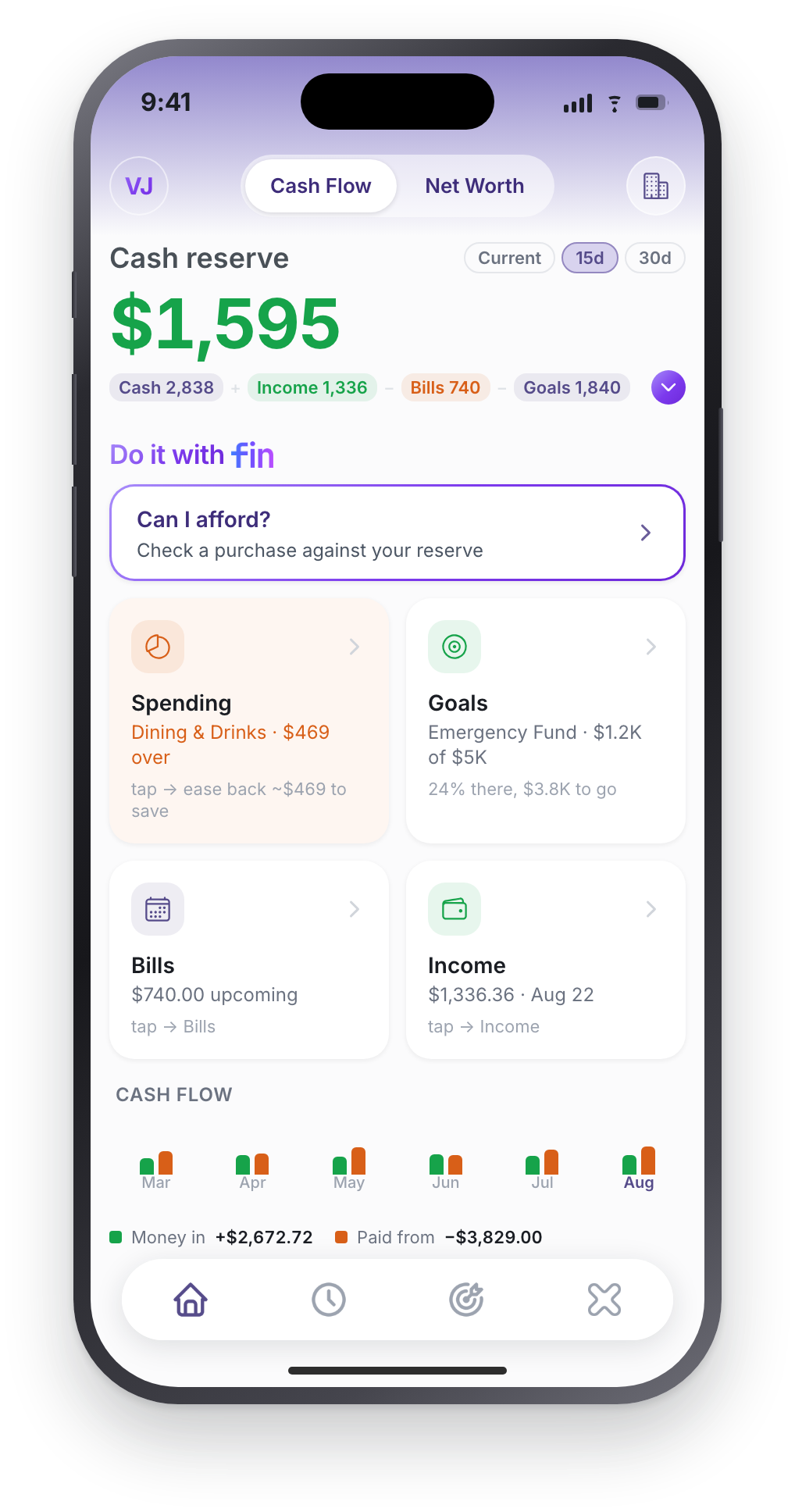
Your cash, plus income landing inside the window you are looking at, minus the bills landing inside it, minus what your goals are already holding. It is the figure left once the money that is already spoken for has been taken out.
Why is my reserve higher than my bank balance?
Because it is a forecast, not a balance. If a paycheque lands inside your window it counts. Narrow the window and it drops back out. The caption under the number always says which one you are looking at, so it is never mistaken for cash in hand.
Why is my reserve lower than my balance?
Usually goals. Money already saved into a goal is held back from the figure you spend against. That is the whole point of committing it. Bills due inside the window come out too.
Can I change the window?
The number itself switches between three: Current (cash on hand), 15 days and 30 days. Those are the chips beside it on the home screen, and 15 days is the one most of the examples on this site use.
Underneath, Settings has a buffer window with more choices (weekly, biweekly, monthly, until next payday, or a custom number of days), which is what the rest of the app plans against. The home-screen chips were deliberately narrowed to two because two is enough to see the shape of a month.
Does it tell me whether a purchase is a good idea?
It tells you what is planned, what is not, and what is left, and it stops there. Whether a purchase is a good idea depends on your job, your family and the month you are having, and we would rather give you the figure than an opinion.
Recurring bills
The full page on recurring bills and subscriptions →
How does Xfin detect recurring bills?
By finding the same merchant charging you on a regular rhythm, then grading how trustworthy that pattern is. How many times, how regular the gap, how much the amount moves. In practice it takes about three charges spanning three weeks before a bill is confident enough to suggest. Two charges make a pattern but not a reliable one.
Why hasn't my bill changed my available money?
Because it is still a suggestion. Confirming is what makes a bill real: a confirmed bill comes out of the reserve before its due date, so it cannot be spent twice. This is the single highest-value ten minutes of setup.
What if a bill changes amount every month?
That is expected and handled. Variable amounts are tolerated and shown as a range. Hydro and phone bills rarely repeat to the cent. Only genuinely chaotic amounts are rejected as not-a-pattern.
What if I pay a bill early, or skip one?
The schedule anchors to the typical day of the month rather than the last charge, so one early or weekend-shifted payment does not drag everything forward. If you want to skip a cycle, there is a Skip this month option, and an Archive that hides a bill while leaving the rule alive so the next charge re-detects it.
Can I add a bill it cannot see?
Yes. A manual bill asks for type, amount, name, how often, the first due date and which account pays it. On the day it is due Xfin asks whether it actually happened (same amount, different amount, or didn’t happen), so the schedule stays honest.
Income
Do I have to tell it how often I get paid?
If your deposits are flowing in (from a bank feed, a statement you imported, or transactions you logged) no. It watches them and works out the rhythm: weekly, every two weeks, twice a month, monthly, quarterly or yearly. Variable amounts are fine, so hourly, overtime and commission pay are still detected. It needs roughly two paycheques to land first.
With nothing flowing in yet, there is nothing to read, so you add your income by hand. See using Xfin without a bank below.
What does confirming my paycheck do?
It anchors your pay cycle, which is what makes “until next payday” mean something. That is a different thing from money entering the reserve. Income counts toward the reserve once the pattern is confident, or once you enter it yourself.
Does expected income inflate today's number?
No. Income counts when it lands, never when it is expected. A paycheque coming Friday does not raise today’s figure. It is stricter than most apps, and it is the reason the number is one you can act on.
I get paid twice a month. Is that supported?
For detection, yes. A twice-monthly pattern is recognised specifically, because it would otherwise be mistaken for every-two-weeks. If you are entering income by hand instead, the options are just this once, weekly, every two weeks or monthly.
Categories and budgeting
Why Xfin has no budgets, and what replaced them →
Do I have to categorise everything myself?
No. Bank transactions arrive categorised, and anything you type or say gets a sensible guess. You correct what is wrong, and when you do, Xfin offers to remember it. Saving a rule updates past matching transactions and every future import from that merchant.
How do I set a spending limit on a category?
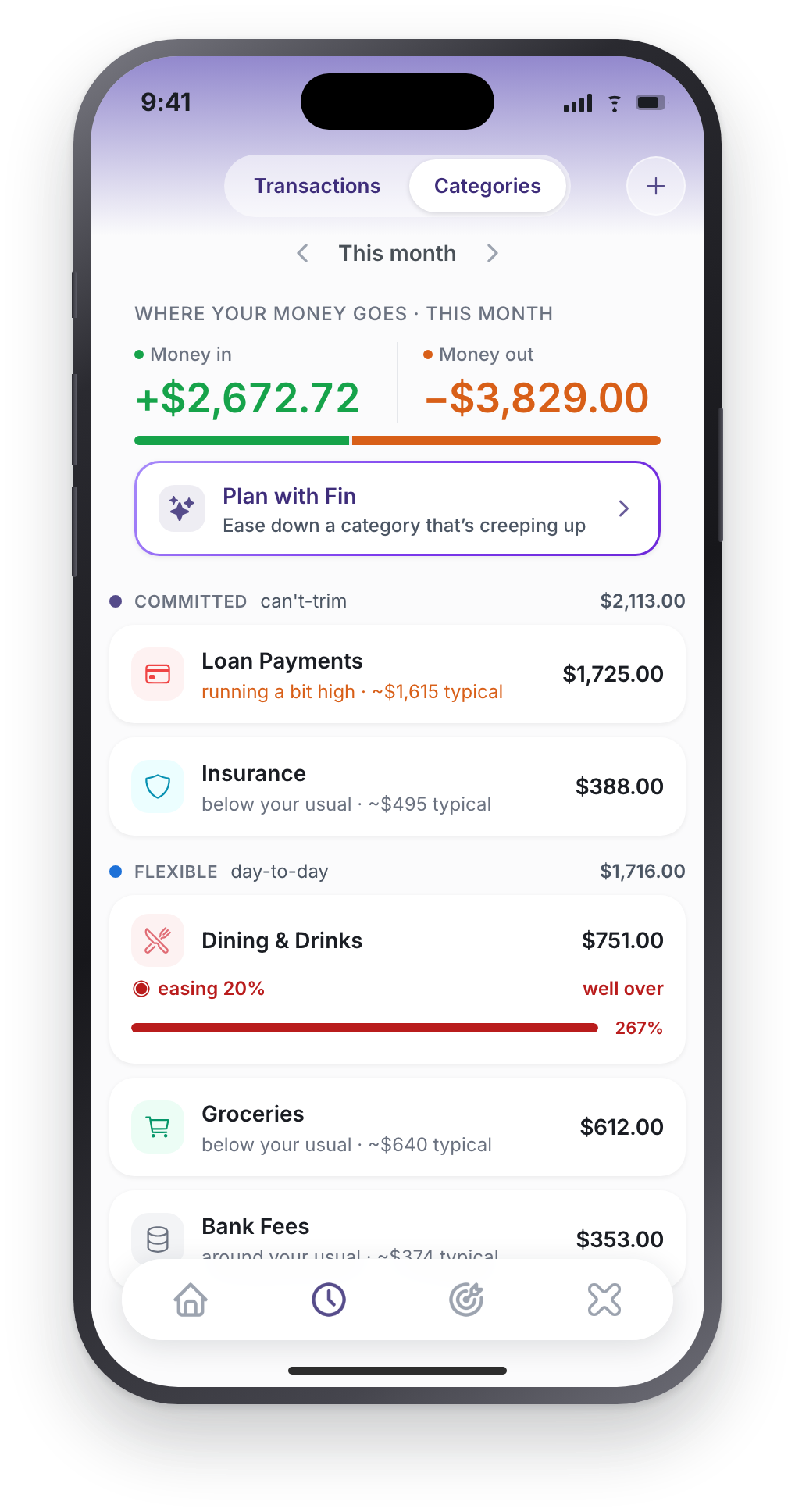
You do not, deliberately. There are no dollar budgets in Xfin. You set a focus instead: pick one flexible category and ease it 5, 10, 15 or 20% below your own usual month. It is a direction, not a cap. Nothing is blocked when you pass it.
Why no budgets?
Because per-category budgets mean setting a dozen numbers and then babysitting them, and almost nobody sustains it. Tracking happens automatically either way, so the only useful decision left is which single category to ease down. Ask Fin for a budget and it will say so and offer a focus instead.
Why can't I set a focus on rent?
Focus is offered on flexible categories only. An ease-down target on a can’t-trim cost is not advice, it is just noise, so the option does not appear there.
What does "watching · baseline building" mean?
That the category does not have enough history yet to judge you against. It is the honest answer while the baseline forms, rather than a made-up percentage. It resolves on its own.
What is committed versus flexible?
Committed is what you cannot trim week to week: rent, mortgage, insurance, utilities, loan payments. Flexible is day-to-day money you can steer. Subscriptions sit in flexible, because a subscription recurs but you can cancel it. Xfin sorts them and you can move any of them.
Goals, and getting to them
What does a goal actually do to my money?
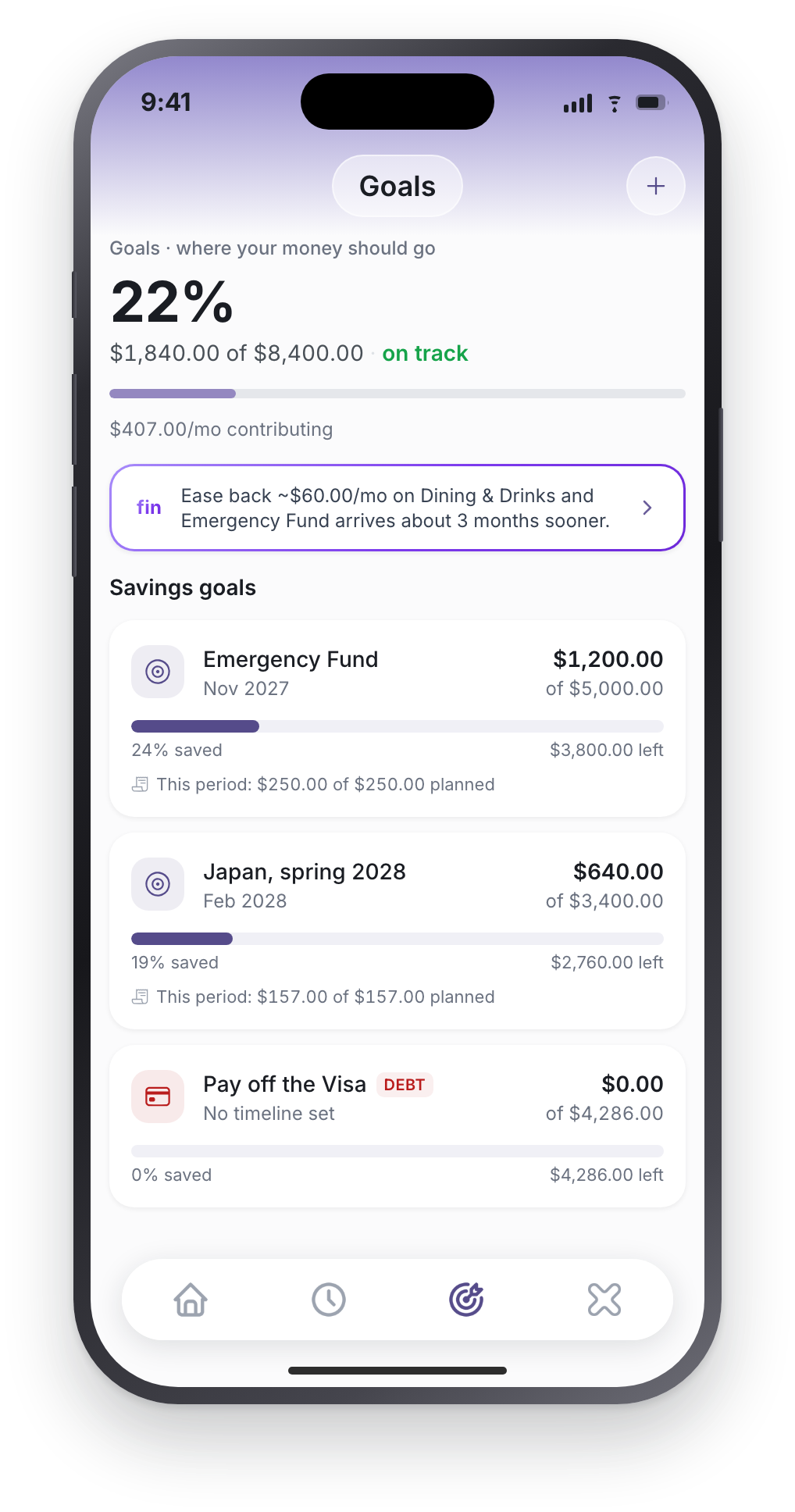
It holds money back. What you have already put into a goal is subtracted from the figure you spend against, so the reserve is what is left after the thing you are working toward has been paid first. Nothing is moved between accounts. The money is still yours, still where it was. It just stops counting as spendable.
Does my monthly contribution come out of the reserve too?
No, and the difference matters. The reserve subtracts what a goal already holds, not what you plan to add to it next month. If you have saved $1,200 toward an emergency fund and contribute $250 a month, it is the $1,200 that comes out. The $250 is a plan, and planning to save is not the same as having saved.
Do debt payoff goals hold money back the same way?
No. A debt payoff goal tracks progress and projects a date, but it is skipped when the reserve is calculated. The payment itself already comes out as a bill, and counting it twice would understate what you have.
What happens if my spending is going to miss a goal?
You are told, and you are told what to do about it. When your pace is off, the app says the goal is at risk and names the category doing the damage: not a general warning, the actual lever. The other direction works too: it will tell you that easing back roughly $60 a month on Dining & Drinks brings the goal in about three months sooner.
What it does not do is price every purchase against your goal. There is no “this coffee put Japan back four days”. That number is mostly theatre, and it makes people stop opening the app.
Will it remind me about a goal on its own?
At milestones: halfway, three quarters, and done. Be clear on how that works: those are worked out on your phone, when you open the app, and then scheduled locally. Nothing is watching your goals on a server, and the reminders do not arrive while the app is force-quit. That is the trade for none of this leaving your device.
Does Fin know what I am saving for?
If you told it. Setup asks what brought you to Xfin and whether there is anything you are working toward, and Fin keeps that, so the answers come back in terms of the thing you actually want, not a generic balance.
Using Xfin without a bank
The full page on running Xfin with no bank connection →
Does bill and income detection work if I never connect a bank?
Yes. Detection reads your transactions, not your bank. Rows you logged yourself and rows imported from a statement are treated exactly like synced ones.
The honest caveat is that it needs something to read. It looks for the same merchant repeating, so it wants two or three logged transactions carrying a real merchant name before it will suggest anything. Log “coffee $6” with no merchant and there is nothing for it to match on. A connected account gets there sooner simply because the history arrives all at once.
Does a bill I add by hand come out of my reserve?
Not while it is upcoming, and this surprises people, so it is worth saying plainly: a hand-added bill is a reminder. It reduces your reserve when you confirm you paid it, at which point a real transaction is written and your balance moves. A detected bill you have confirmed behaves differently. It comes out ahead of its due date.
The exception is a credit card minimum, which does reduce the reserve while upcoming.
What if I set up a bill or income with no account attached?
It stays a reminder. Confirming it writes no transaction and your reserve does not move. The app tells you as much rather than pretending: “No paying account is set on this reminder, so no transaction was logged.” Attach an account in Manage bills or Manage income and it starts counting.
How do manual balances stay right?
They are computed from what you log. Starting balance plus every transaction. If they drift from your statement, open the account and use Reconcile balance: enter the figure on your statement and Xfin posts a single adjustment so the list still adds up to it, rather than silently overwriting your history.
More than one account
How net worth counts them all →
How does the reserve handle several accounts?
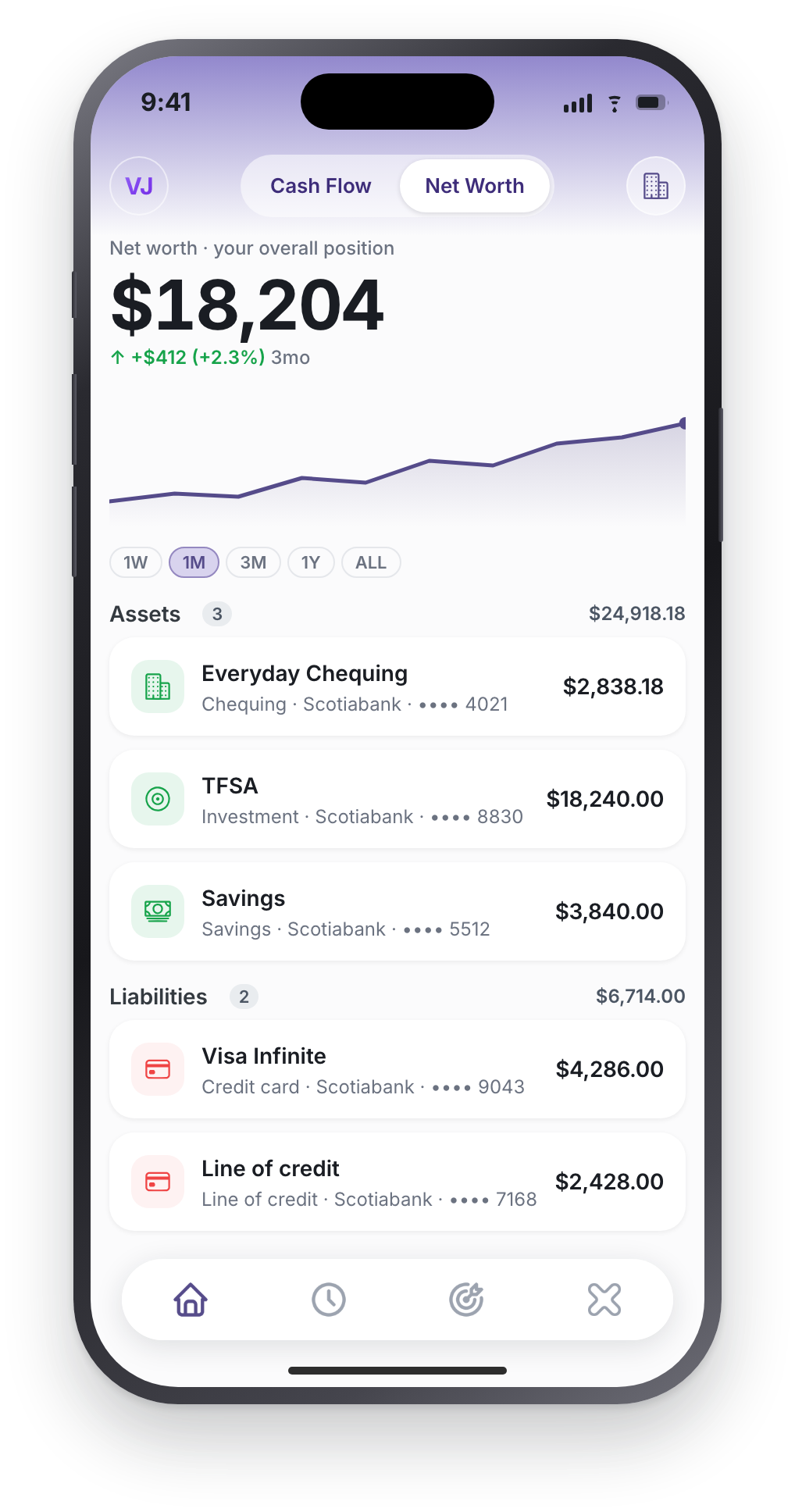
It sums your chequing, cash and savings balances. Credit cards, loans, investments and retirement accounts are not part of it. They belong to net worth, not to what you can spend this fortnight. Any single account can be switched out of the reserve individually if you would rather it did not count.
How does Fin know which account a purchase came from?
With one account, it uses it and does not ask. With several, name it, “coffee $6 on my Visa”, or Fin asks “Which account should I record this to?” and offers your accounts as tappable options. If you name one it cannot match, it says so and lists what you have instead of guessing. There is more on this on the Fin page.
Can I add transactions to a connected account by hand?
No, and deliberately. Your bank is already sending those, so hand-entry would double-count. Connected accounts are marked linked. Log cash spending, or anything from an account Xfin cannot see, against a manual account.
My goal is linked to an investment account. Why has my reserve not moved?
Because only goals funded from chequing, cash or savings hold money back from the reserve. A goal pointed at a brokerage or retirement account still tracks progress and still counts toward net worth, but it reserves nothing from your spendable cash. The app notes this when you pick the account.
Fin, the assistant
What can Fin actually do?
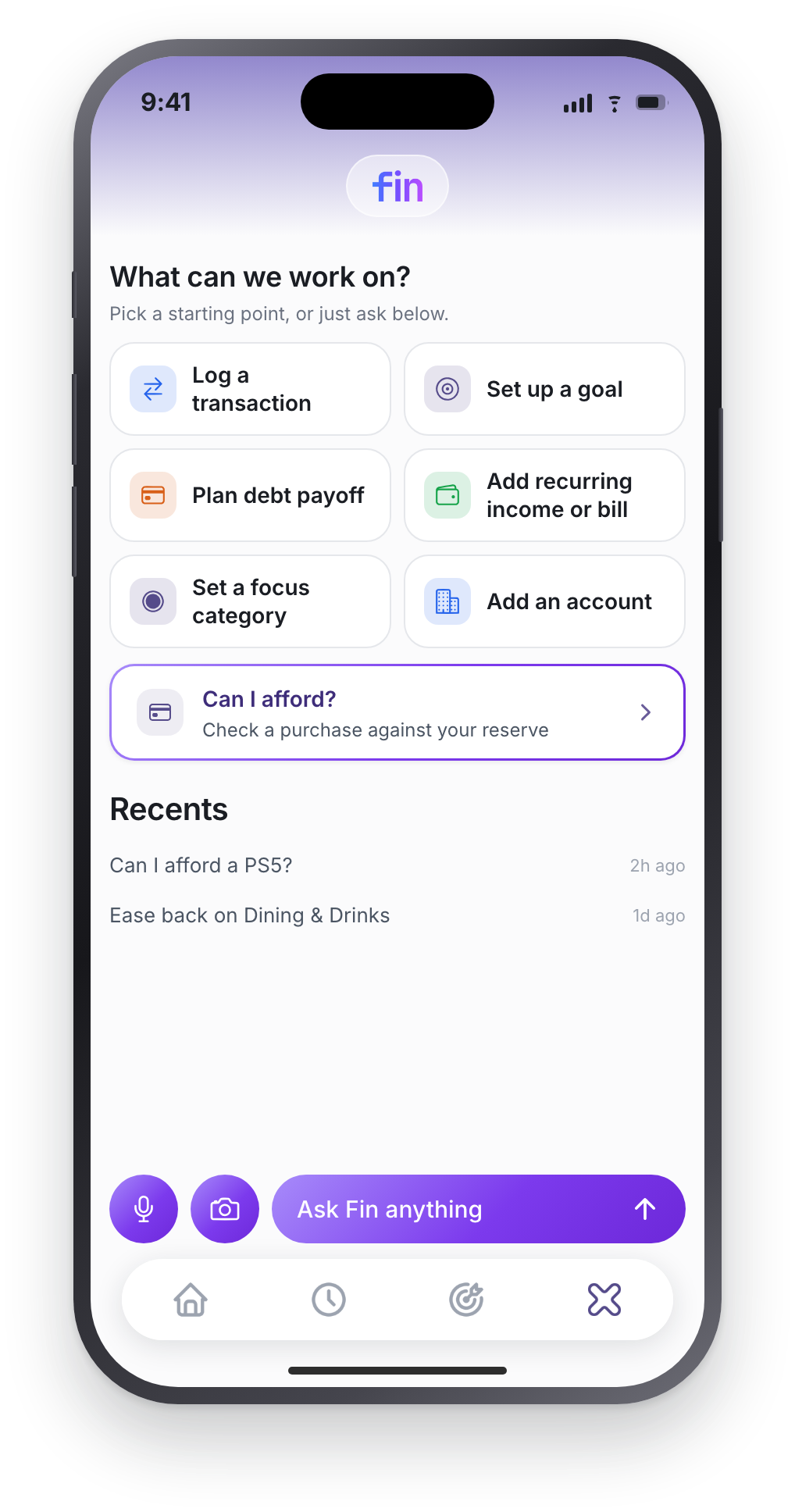
Log transactions, set up recurring bills and income, create and update goals including debt payoffs, add and update manual accounts, create categories, set a focus, reclassify in bulk, and answer questions in your own figures. The guide lists real phrases for each.
Can Fin move my money?
No. There is no transfer, payment or account-number capability anywhere in the app, and bank access through Plaid is read-only. Fin records and organises money; it never moves it.
Does anything happen without me confirming?
Four things are written straight away, because confirming them twice is friction with no payoff: logging a transaction, adding a recurring bill, adding recurring income, and adding a manual account. Everything else shows you a card first, with a button naming exactly what it will do. Deletions ask twice.
Will Fin ever claim it did something it didn't?
No. There is a layer whose only job is to strip a completion claim out of any reply where the write did not actually happen. If it failed, it says so.
Is there a limit on asking Fin things?
There is a fair-use allowance that resets at the start of each month, and a short cool-off if you send a burst of messages at once. Normal use will not meet either.
What does Fin see about me?
A summary of your figures, not your raw records. Account names are masked, institution names and your own notes are dropped, and balances are rounded into ranges before anything leaves your phone. The privacy policy spells it out.
Accounts, data and devices
Do I need to connect a bank?
No. Three ways in, and only one touches your bank: connect through Plaid, tell Fin what you have in plain words, or import a PDF or CSV statement. Manually added accounts behave exactly like connected ones.
Does Xfin see my bank login?
Never. Plaid opens its own screen on top of Xfin and you sign in there. What comes back is a token that lives on our server and is never sent to your device. You can cut any connection at my.plaid.com or inside the app. Connecting your bank covers who Plaid is and how to fix a connection that hangs up.
Where does my financial data live?
On your phone first. Transactions your bank sends through Plaid, your net worth history and your conversations with Fin stay on the device and are never copied to our server. Cloud backup is on by default and keeps a copy of what you create in the app: accounts and balances, the transactions you enter or import, categories, goals and rules. You can turn it off in Settings. The server also holds your profile, notification preferences and messages, bank tokens, subscription status and security logs. The data usage policy names every item.
Which countries is it available in?
Canada and the United States, on iPhone. Bank linking through Plaid is limited to those two; elsewhere you can still use the app by importing statements or adding accounts by hand.
What happens if I delete the app?
With cloud backup on, which is the default, signing in on a new phone brings back your accounts, manual transactions, categories and goals. With it off, nothing comes back: there is no copy on our side to restore. Either way your chat history and your Plaid-fetched transactions are not restored from us. Export before changing phones. Support covers export, deletion and cancellation.
Still stuck?
The guide walks through setup step by step, and support answers the account and billing side. If something here does not match what the app does, tell us. We would rather fix the page than leave it wrong.
Related: can I afford it? · how long will it take to save? · about Xfin